Is That Virus Warning Real? A Quick Guide
If a scary “virus detected” message pops up on your Windows PC, don’t panic — and don’t call any phone number it shows you. Most of these are fake. Here’s how to tell the difference.
It’s probably FAKE if…
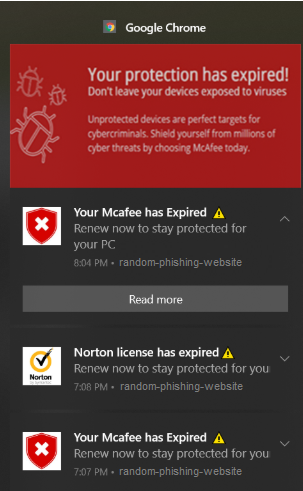
Windows Notification are very common currently and can be from browser notifications (Edge, Chrome, Firefox etc.). Notification options come from your browser if you inadvertently accept notifications from dodgy websites. To stop these you need to go into your browser settings and remove the dodgy sites which you have inadvertently allowed.
Pop ups from Windows Notifications, usually on the right 15% of your screen.
To remove them you need to go into the settings of probably the default browser, go to Settings and search for Notifications.This link below will take you to the correct place if its Chrome.
chrome://settings/content/notifications
For Edge try
edge://settings/privacy/sitePermissions/allPermissions/notifications
For Firefox try
about:preferences#permissionsData
Look for sites that have been permitted to give notifications and remove them unless you recognize them and have added them deliberately.
Fullpage popups or popups within the browser.
It appeared while you were browsing in Chrome, Edge, or Firefox
It has a countdown timer (“act within 5 minutes or your files will be deleted”)
It tells you to call a phone number for “Microsoft support”
It has spelling mistakes, odd logos, or looks slightly “off” compared to normal Windows styling
You can’t close it normally, or closing it opens more popups
What it actually is: a webpage designed to look like a system alert. It hasn’t scanned your computer — it can’t. It’s just trying to scare you into calling a scam call centre or downloading fake “cleanup” software.
What to do: Don’t click anything on the popup. Open Task Manager (Ctrl + Shift + Esc), find your browser, and click End Task. If it keeps happening on the same site, avoid that site — it may be running malicious ads.
It’s probably REAL if…
- It came from the shield icon in your system tray, or a Windows Security / Windows Defender window
- You can find a matching entry in Windows Security → Protection History
- No phone number, no countdown, no demand for payment
What to do: Follow the on-screen options in Windows Security (Quarantine/Remove), then run a full scan. If you’re not sure what it found or how to proceed, that’s exactly the kind of thing worth a quick call to us rather than guessing.
A few habits that help either way
- Never call a number or click a link from a popup — go directly to real antivirus software instead
- Keep Windows and your browser updated
- Be cautious with anything you were prompted to install by an ad or “free download” site — this is the most common way adware gets on a machine in the first place
Not sure whether what you’re seeing is real?
Send us a screenshot or give us a call — happy to take a quick look before you do anything drastic.
Jonathan McKee PC Doctor — Portrush | Serving Coleraine, North Antrim, the Causeway Coast & County Derry